Accurate event tracking is essential for:
Model training, which in many cases relies on event data and real user behavior.
Analytics and performance reporting.
With this in mind, it is important to understand the context of each event and when or why it should be fired.
For more details on implementing event tracking through the XGen SDK, go here.
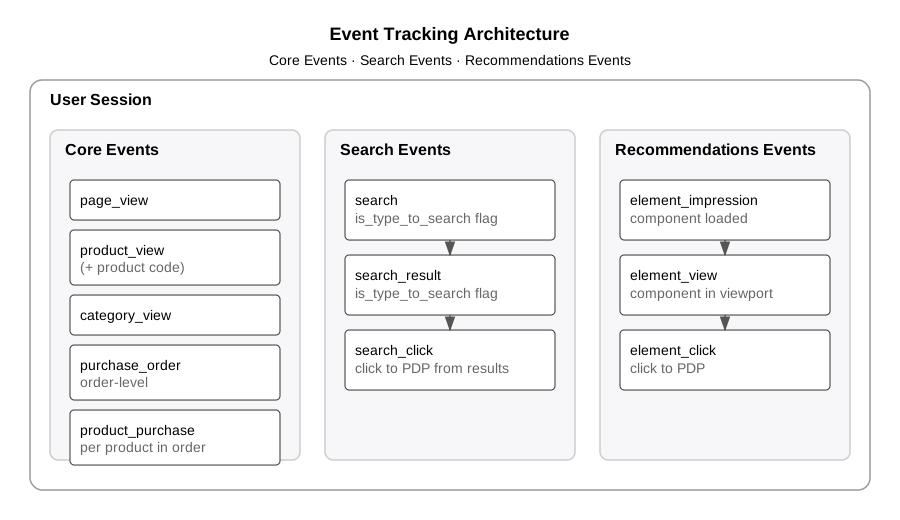
Core Events
Core events are foundational, site-wide interactions not tied to any specific tool or feature. These include:
Page View: A
page_viewevent should fire any time a page loads.Product View: A
product_viewevent should fire any time a PDP loads, including the product code in the event context. This should fire in addition topage_view.Category View: A
category_viewevent should fire any time a PLP loads. This should also fire alongsidepage_view. This event should include both the category being viewed, as well as the first four products displayed in the category.Purchase Order: A
purchase_orderevent should fire whenever a purchase is completed, containing summary-level order data.Product Purchase: A
product_purchaseevent should fire once for each product included in an order.
Search Events
Search events capture all user interactions related to search behavior. These include:
Search: A
searchevent is fired any time a user performs a search.If search results appear as the user types, set
is_type_to_searchtotrue.If the user performs a full/explicit search (e.g., submitting and viewing a SERP), set
is_type_to_searchtofalse.
Search Result: A
search_resultevent is fired any time search results are returned and shown to the user.If results are generated during type-to-search, set
is_type_to_searchtotrue.If results appear during a full SERP view, set
is_type_to_searchtofalse.
Search Click: A
search_clickevent is fired any time a user clicks a product from search results and navigates to a PDP.
Recommendations Events
Recommendation events capture interactions with recommendation modules. These include:
Element Impression: An
element_impressionevent fires when a recommendation component loads, even if not visible in the viewport.Element View: An
element_viewevent fires when a recommendation component becomes visible in the viewport.Element Click: An
element_clickevent fires when a user clicks a product within a recommendation component, navigating to a PDP.